Free Reliability Prediction software tool for MTBF (or failure rate) calculation supporting 26 reliability prediction standards: MIL-HDBK-217, Siemens SN 29500, Telcordia, FIDES, IEC 62380, BELLCORE etc.
Welcome to our Calculator by ALD Software! If you're looking for a reliable and user-friendly software to calculate the Mean Time Between Failures (MTBF) of your products, you've come to the right place.
MTBF Calculator by ALD Software is a powerful tool that allows you to quickly and accurately estimate the reliability of your products. It uses a variety of industry-standard methods and algorithms to calculate MTBF, such as the MIL-HDBK-217F, Telcordia SR-332, FIDES, and more.
With Calculator, you can easily calculate the MTBF of your products based on design parameters and operating conditions. This can help you make informed decisions about your product design and product reliability. High MTBF is crucial for reducing warranty costs, improving customer satisfaction, improving competitiveness of a product.
MTBF Calculator by ALD Software is completely free and easy to use. Simply enter the required parameters such as the number of components, operating temperature, and stress factors, and the calculator will generate an accurate MTBF estimate.
In addition to calculator, we also provide a wealth of information and resources on product reliability and MTBF calculations. Browse our site to learn more about reliability and RAMS engineering, reliability prediction methods, and best practices for improving product reliability. So why wait? Try Free MTBF Calculator by ALD Software today and start improving the reliability of your products.
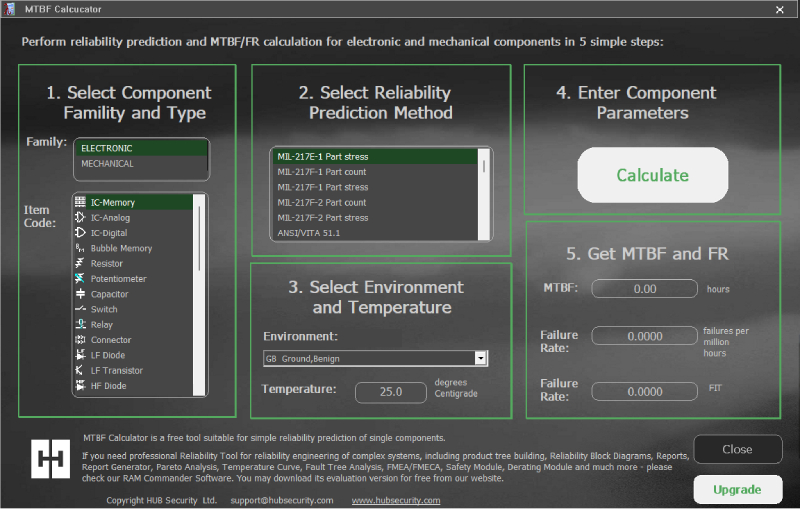
Reliability Prediction Tool by ALD Software Ltd.
Select Component Family and Type.
Select Reliability Prediction Method.
Select Environment and Temperature.
Enter Component Parameters.
Get MTBF and Failure Rate (FR).
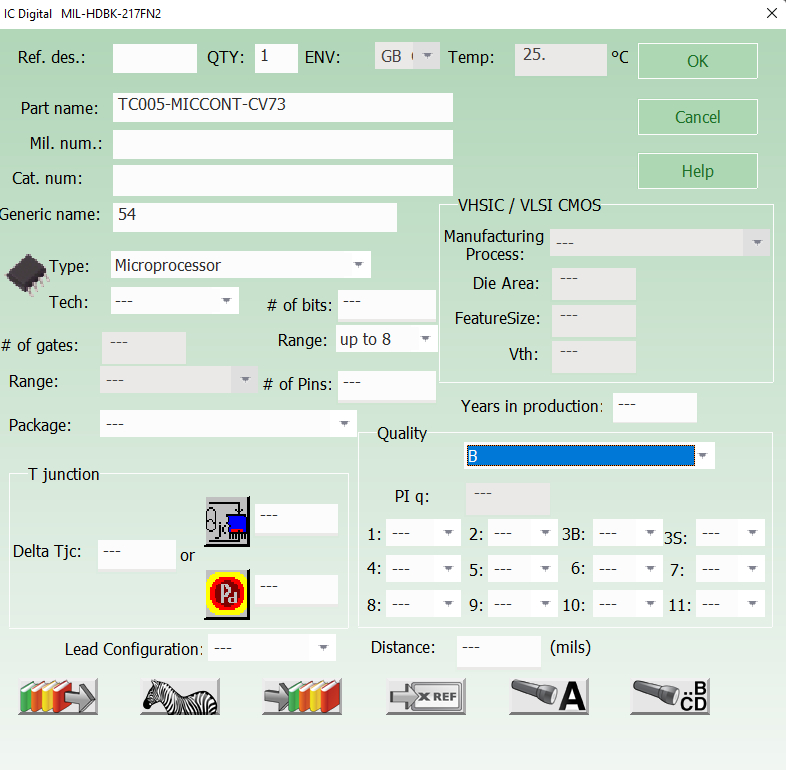
Standard-compliant component calculation matrix
The software package also contains Reliability Data Component Library for active electronic components (IC-Digital, IC-Analog, IC-Memory) and Part Number automatic recognition algorithms for the most popular manufacturers of capacitors and resistors (see user guide for manufacturers list).
Field Validation & Reliability Prediction Analysis | ALD Reliability Engineering Division
Standard MTBF calculations often assume nominal room-temperature operating conditions (25°C ambient). However, in high-stress industrial applications—such as oil & gas downhole drilling, automotive powertrains, or steel manufacturing—thermal stress accelerates component degradation exponentially.
Relying solely on nominal datasheet figures can lead to severe overestimations of system availability. Thermal acceleration models must be integrated directly into reliability calculations to reflect real-world operational stress.
Electronic component failure rates roughly double for every 10°C increase in operational ambient temperature:
ALD reliability specialists tracked 1,200 piezoelectric sensors across 24 months of continuous operation. The variance between nominal datasheet figures and measured field performance highlights the impact of operational temperature stress:
Unadjusted nominal MTBF figures overstate system life by up to 23x under severe thermal stress. Always incorporate temperature-derating multipliers from standards such as MIL-HDBK-217F FN2, Telcordia SR-332, or FIDES Guide into your predictions.
Yes, ALD MTBF Calculator is a free Windows Desktop application. Simply download the setup package and install it directly on your PC running MS Windows.
For complete step-by-step guidance, refer to the official MTBF Calculator User Manual - Reliability Prediction with ALD MTBF Calculator included with the setup.
The documentation answers key operational questions including:
- Where to get the installation package
- How to install and register the software
- What to do if you encounter technical problems or questions
ALD delivers complete RAMS, ILS, FRACAS, and Quality Solutions through enterprise software (RAM Commander, DLCC, FRACAS), expert engineering services, and professional training.